


What’s New in Angular 20: Key Features & Major Changes
Angular 20 represents a major advancement in reactive programming and rendering optimization. It builds upon five years of framework evolution and continuous feature improvements. This release introduces signals-based reactivity, enhancing state management and performance for applications. Granular server-side hydration ensures efficient rendering while maintaining backward compatibility with previous versions. Modern template syntax simplifies development, making code more readable and easier to maintain. Early adopters report 30-40% faster initial renders, improving overall user experience significantly. Unnecessary re-renders are reduced by 50%, according to comprehensive benchmarking conducted recently. These improvements empower dedicated Angular developers to build faster, scalable, and maintainable applications. Teams can leverage these features to optimize application performance across multiple platforms. Angular 20 sets a strong foundation for future innovations and enhanced web development.
Summing Up:
- Angular 20 enhances rendering performance, reducing lag and improving overall user experience with faster, smoother applications.
- Zoneless reactive signals and incremental SSR hydration provide developers greater control, ensuring smarter updates and improved efficiency.
- Updated control flow with simplified template syntax reduces boilerplate, making Angular code cleaner, readable, and easier to maintain.
- Advanced security features like XSS, CSRF protection, and CSP enforcement ensure safer, more secure Angular web applications.
- Cloud deployment is streamlined with Angular 20, offering seamless integration across AWS, Heroku, and Google App Engine.
How is Angular20 a Game Changing Release?
Angular20 emerges as a transformative release, building on a solid foundation of AngularJS. Its enhanced performance, streamlined development workflow, and cutting-edge features empower developers to create highly scalable, dynamic applications effortlessly. Leveraging the advantages of AngularJS in web development, Angular 20 ensures faster rendering and seamless integration with modern tools. Angular20 introduces many new features missing in Angular19 entirely with cleaner code maintainability. Combining the principles of Angular JS, Angular20 comes with futuristic capabilities for dynamic, maintainable applications. This evolution overcomes obstacles of previous Angular versions, making Angular20 a true game-changer for web development projects.
What Are the Transformative Features of Angular 20?
1. Zoneless Reactive Signals:
Angular20 introduces zoneless change detection, removing the reliance on Zone.js and combining it with reactive signals. This boosts app performance, reduces unnecessary renders, and provides developers precise control over UI updates, making apps faster, smoother, and more maintainable compared to Angular19.
Benefits:
- Faster Rendering Speeds: Angular20 handles UI updates more efficiently than Angular19, reducing lag and improving user experience significantly.
- Cleaner Debugging Experience: Compared to Angular19, Angular 20 generates simpler stack traces, making error tracking faster and easier.
- Reactive Control Improvements: Developers can now manage updates precisely, offering superior reactivity and maintainability over Angular19.
2. Incremental SSR Hydration:
Angular20 now offers stable incremental hydration for server-side rendering, enabling developers to hydrate components selectively rather than loading the entire page at once. This reduces JavaScript bundle size, improves web vitals like Time to Interactive and First Input Delay, and simplifies SSR performance management. Compared to Angular or AngularJS, Angular20 achieves faster, more efficient server-rendered experiences with minimal developer effort.
Benefits:
- Optimized Load Times: Incremental hydration in Angular20 reduces initial payload, enhancing page speed compared to Angular19.
- Improved Interactivity: Users experience faster interactions and reduced delays, outperforming traditional AngularJS SSR methods.
- Simplified SSR Management: Developers can enable hydration per component easily, providing more control than 19 approaches.
3. Enhanced Control Flow:
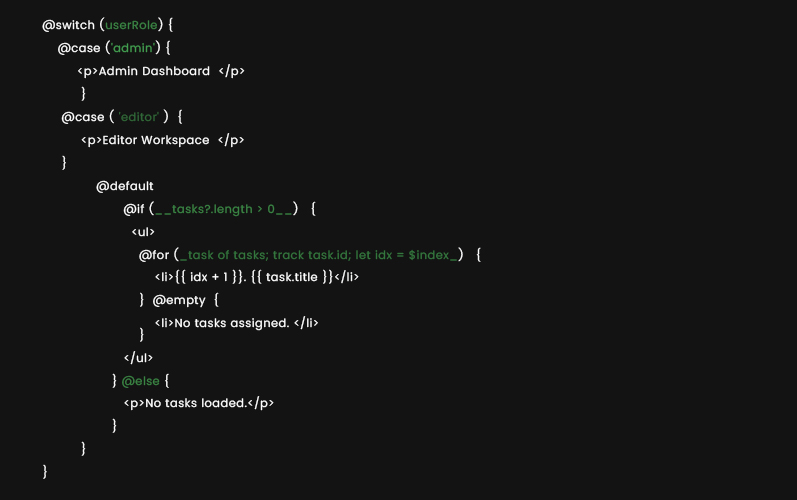
Angular20 refines the @switch control flow, providing a JavaScript style syntax for conditional rendering. The updated @if and @for blocks replaced deprecated *ngIf, *ngFor, and *ngSwitch, reducing template boilerplate. It enforces compile-time safety and making code more readable-ideal for modern Angular development services.
Benefits
- Simpler Template Structure: Eliminates excessive <ng-template>tags, streamlining component markup.
- Reliable Type Safety: Ensures compile-time validation, reducing runtime errors in complex templates.
- Improved Code Readability: JavaScript-like syntax makes templates intuitive for developers of all levels.
Angular 20’s new control flow syntax brings a sleek, JavaScript-like feel to templates. Here’s how you can use @if, @for, and @switch to mirror the features you described:
1. Conditional Rendering with @if / @else if / @else
2. Looping with @for
3. Switch-case via @switch / @case / @default
4. Runtime Component Creation:
Angular20 stabilizes dynamic component creation with the create Component API, enabling type-safe declarative instantiation at runtime. Developers no longer need View ContainerRef or Component Factory Resolver. Angular20 handles dependency injection, lifecycle hooks, change detection, and content projection, simplifying code and improving compatibility with signals and standalone components.
Benefits:
- Minimal Step Required: Create components quickly without complex boilerplate or manual injection.
- Flexible DOM placement: Dynamic components cab be rendered anywhere in the application structure.
- Seamless Angular Integration: Fully supports dependency injection, lifecycle hooks and content projection automatically.
5. Expanded Template Syntax:
Angular20 allows advanced expressions in templates, like exponentiation, in checks, and untagged template literals. This also enables inline calculations, dynamic class generation, and cleaner, more readable templates without extra helper methods.
Benefits:
- Inline Calculations: Perform math operations directly in templates.
- Simplified Conditionals: Check object properties easily using in.
- Dynamic Styling: Generate class names without relying on Ng Class.
1. Exponentiation in Templates (**) Square of 5: {{ 5 ** 2 }} Power Example: {{ base ** exponent }}
2. Inline Calculations Total Price: {{ price * quantity – discount }} Area of circle: {{ Math.PI * (radius ** 2) }}
3. Dynamic Class Generation <div class=”status {{ isActive ? ‘active’ : ‘inactive’ }}”> User is {{ isActive ? ‘Active’ : ‘Inactive’ }} </div> <!– With multiple conditions –> <div class=”badge {{ score > 90 ? ‘gold’ : score > 75 ? ‘silver’ : ‘bronze’ }}”> {{ score }} </div>
4. Untagged Template Literals <p>{{ `Welcome, ${user.firstName} ${user.lastName}!` }}</p> <p>{{ `Your total is $${price * quantity}` }}</p>
5. Cleaner Conditional Checks <p>{{ age >= 18 ? `Eligible (Age: ${age})` : `Not Eligible (Age: ${age})` }}</p>
6. Host Bindings:
Angular20 improves host bindings and listeners with full type safety and IntelliSense, reducing errors. Developers now get clear, maintainable code without cluttered decorators. It enables dedicated angular developers to catch mistakes early during development of applications.
Benefits:
- Stronger Type Safety: Host binding expressions now detect errors at compile-time for more reliable code.
- Cleaner Code Structure: Reduces decorator clutter, making bindings easier to read and maintain.
- Faster Error Detection: Angular Language Service flags incorrect method calls or arguments immediately.
7. DevTools Hydration Debugging:
Angular20 DevTools (v21+) highlights @defer components with icons, showing hydration states. Each block shows its hydration state- pending, hydrated, or error. It also simplifies incremental hydration monitoring and debugging.
Benefits:
- Easy State Tracking: Quickly identify pending, hydrated, or failed components for efficient debugging.
- Improved SSR Insight: Provides clear visualization of server-side rendered component hydration status.
- Faster Issue Resolution: developers can spot and fix hydration errors immediately, saving time.
8. Stabilized Reactivity APIs:
Angular20 stabilizes key signal-based reactivity APIs like effect, linkedSignal, and toSignal. This enables predictable state updates, efficient async handling, and seamless integration with HttpClient. This is ideal for modern Angular development services and robust real-world applications.
Benefits:
- Predictable Updates: Signals provide reliable, automatic reactions to state changes.
- Simplified Async Handling: Resource APIs streamline tracking of loading, error, and resolved states.
- Enhanced Integration: Works seamlessly with HttpClient for reactive data fetching in apps.
9. Improved PaaS Integration:
Angular20 enhances deployment to PaaS platforms like Heroku, AWS, and Google App Engine. The Angular Deploy tool simplifies deployment workflows, making cloud deployments faster and smoother for dedicated Angular developers.
Benefits:
- Simplified deployment: Streamlined process reduces manual setup and errors on popular cloud platforms.
- Faster cloud releases: Developers can push updates quickly, improving overall release efficiency.
- PaaS flexibility: Supports multiple platforms seamlessly, empowering dedicated Angular developers to choose preferred environments.
10. Advanced Security Protections:
Angular20 strengthens built-in security against XSS and CSRF attacks, now supporting Content Security Policy enforcement. Developers can define and maintain robust security rules efficiently, protecting applications for dedicated Angular developers.
Benefits
- XSS and CSRF protection: Automatically mitigates common web vulnerabilities in Angular applications.
- CSP enforcement: Allows developers to define strong security policies across applications.
- Safer coding practices: Enhances developer confidence by providing secure defaults for projects.
What Are the Major Changes Done from Angular17 to Angular20?
Angular20 introduces key upgrades over Angular17, including Signals stabilized for production use, Zoneless optional, Full CLI, naming, and DevTools enhancements. Testing also improves through Modern runners (Vite, Jest, etc.) supported from Karma primary.
How to Upgrade to Angular 20?
To move your application to Angular20, follow these simple steps designed for dedicated Angular developers:
- Update Angular CLI Globally:
npm install -g @angular/cli
- Update Angular CLI Locally in Project:
ng update @angular/cli
- Upgrade Angular Core and Dependencies:
ng update @angular/core
- Confirm Application Stability:
Run the application and validate that all core features function correctly.
Conclusion- How TTC Helps to Adopt This Transformation
Angular20 delivers notable enhancements in speed, security, and overall developer efficiency. Transitioning to this release guarantees applications leverage the latest innovations, ensuring a strong, scalable, and future-ready foundation for modern web development projects. The Tech Clouds (TTC) specializes in building web applications with Angular20. Hire our dedicated angular js developer team and broad expertise in this domain enable us to craft fully customized, high-performing, and secure applications tailored to your unique business requirements. If you need expert guidance with upgrading to Angular20 or have any other queries, feel free to reach out.

Frequently Asked Questions
How Can You Upgrade to Angular 20?
Upgrade to Angular20 by updating Angular CLI, dependencies, and TypeScript, followed by code adjustments and testing. Use Angular’s official upgrade guide and ensure compatibility with new APIs and features.
How TTC helps you in this process?
TTC provides end-to-end support—planning, upgrading, debugging, and optimizing. Their experts ensure faster transitions, reduced downtime, and best practices adoption, making Angular20 migration seamless and reliable for businesses.
Recent Posts







Related Blogs

AI App Development Trends 2027: What Businesses Need to Know
A CTO opens two dashboards side by side. One is his competitor's; the other is his own. The competitor's page was built on an AI system that tracks customers' order...

How to Speed Up Your WordPress Site: The Ultimate Optimization Guide
You have gone above and beyond to build your WordPress site, but when a visitor arrives, the loading wheel starts spinning. First 3 seconds gone, then five and so on....

App Development Cost by Country in 2027: USA vs UK vs India
You may want a web app or mobile app with almost the same features, but you’re still getting three different quotes from three different agencies in three different countries. App...

How to Hire Dedicated Developers: A Complete Guide from Scratch
Most businesses don't plan to outsource. It happens when your internal teams can’t cope with the demands of the existing market. Suppose a project that requires something which your present...

The 7 Phases of Web Development: From Idea to Launch
Anyone can think of a website design while working late at night or doing a job at dawn, but the problem hits when it comes to turning it into reality....

Mobile App Development in 2026: PWA vs Native vs Hybrid vs Cross‑Platform – Which Is Best for Your Business?
Ask five developers about the best way of building mobile apps in 2026. There’s no doubt in this that you’ll get five different answers. Some swear by natives, whereas others...
Why Your Website Is Slow and How the Right Development Framework Solves It
Ever clicked on a site and just... left before it even loaded? You're not alone, and neither is your website if it's doing the same thing to its visitors. Mainly,...

Best Technologies for Web Application Development in 2026
Web application development has changed a lot even in the last couple of years. Frameworks keep moving; people expect pages to load within a second, and sticking with outdated tools...