


Mobile App Development in 2026: PWA vs Native vs Hybrid vs Cross‑Platform – Which Is Best for Your Business?
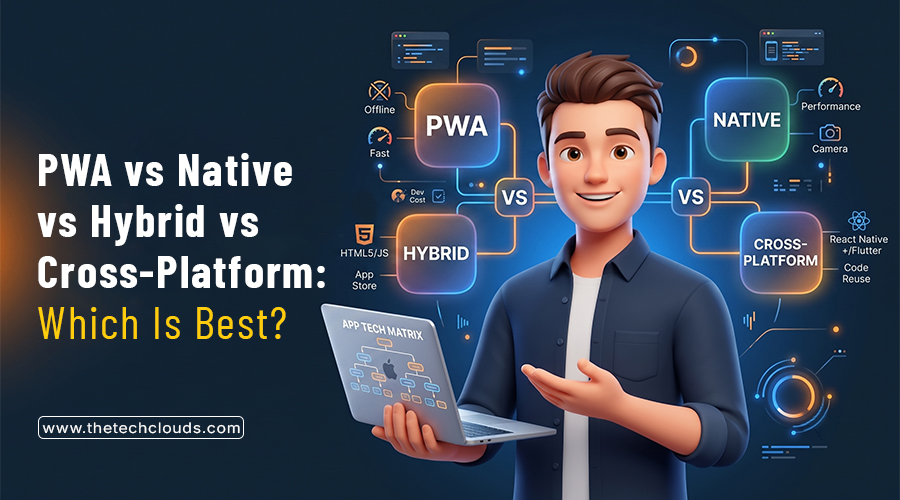
Ask five developers about the best way of building mobile apps in 2026. There’s no doubt in this that you’ll get five different answers. Some swear by natives, whereas others like PWAs. Some say hybrid is best today, while others support cross-platform apps. But honestly, there is no single right answer. The right option depends on your goals, timeline, budget, and requirements. This article thoroughly breaks down Native, PWA, Hybrid, and Cross-platform builds, so when you ask for mobile app development services, you will already have clarity on these options.
Key Takeaways
- Native wins if your app leans hard on the camera, GPS, or anything that needs the phone’s full hardware, banking apps and games usually go this route.
- PWAs are basically websites in disguise, no app store, no download, just open a link, and it works like an app.
- Cross-platform tools like Flutter or React Native let you build once and launch on both iOS and Android without hiring two separate teams.
- Hybrid hasn’t disappeared, but most developers have quietly moved on to cross-platform frameworks since they handle things a bit better these days.
- At the end of the day, there’s no single winner; The option that works for a bank won’t work for a small online store.
Native Apps- Overview
Native apps are those built for specific platforms, either Android or iOS. Developers use programming languages such as Swift or Kotlin to build these apps. They are fast, smooth, responsive, and hardly lag on animations. The catch with native apps is that you have to build the same app twice for both platforms. People often ask about the features, strengths, and weaknesses when they are confused about PWA vs. Native Apps. Here’s the click:
Key Features:
- Natives taps straight into the phone’s camera, GPS, sensors, whatever the app needs.
- Simple language format; Kotlin for Android and Swift for iOS.
- You can easily list them on the App Store or Google Play.
- You will get notifications without any extra effort.
- One of the most prominent features of Native apps is that they run effectively without any data or wifi connection.
Key Strengths:
- Nothing beats it for raw speed on a phone.
- Scrolling, swiping, all of it feels smooth.
- Get access to every device feature.
Key Weaknesses:
- The problem is that you need to invest twice for the same app across two different platforms.
- Two different codebases mean extra effort, time, money, and patience are needed.
- Every update has to go through testing twice, which is a more complicated and difficult process.
Hybrid Apps- Overview
Hybrid apps run on a single codebase wrapped inside a native shell. You need tools like Ionic or Cordova. The best feature of hybrid apps is that you write the code once and can use it across different platforms. However, it requires a browser engine underneath to actually run. People often compare hybrid vs. native apps, but honestly can’t get the real difference between them. Here, you can clearly understand hybrid features, pros, and cons, so you can determine what is better for your business.
Key Features:
- One codebase covers both iOS and Android, no double work.
- They always run inside a native wrapper while using web tech underneath.
- Developers use HTML, CSS, JavaScript, and frontend frameworks such as Angular, React, and Vue.
- Hybrid apps can tap into some device features that are also available through some plugins.
- Updates roll out to both platforms at once.
Key Strengths:
- Way cheaper than building two different versions.
- Gets you to market a lot quicker.
- One team can handle the whole build; two developers or separate teams are not required.
Key Weaknesses:
- Obviously not as smooth as true native apps.
- Heavy graphics or animations can stutter a bit.
- To access certain device features, you need additional plugins.
Progressive Web Apps (PWAs):
PWAs are basically websites that behave like an app. Users open them through browsers and can add them to the home screen. They load fast, work offline, and don’t need to be downloaded from the app store. Once you see the benefits of Progressive Web Apps (PWAs), you can easily understand why startups and small businesses lean towards them.
Key Features:
- PWAs live in the browser; no app store needed to install them.
- They add themselves to your home screen just like a real app.
- Updates happen instantly; nobody has to download anything new.
- They work offline too, and one build is enough for phones, tablets, and desktops.
- Hire HTML developers, as PWAs need HTML, CSS, and JavaScript.
Key Strengths:
- Costs are relatively lower, as no separate builds are required.
- Skips the whole app store approval wait.
- Easy to update, push a change, and everyone gets it.
Key Weaknesses:
- Can’t touch as many device features as native apps can.
- Performance is a bit slower compared to native, especially with heavy use.
- Discoverability is tougher since it’s not available in the App Store.
Cross‑Platform- Overview
Cross-platform apps use one codebase for both iOS and Android. Developers build these apps through the React Native App Development process or using Flutter, then compile them down into actual native code. They are not exactly the same as hybrid apps, as they don’t need a browser to run. A lot of teams turn to this route when app development on mobile needs to be faster without splitting the work into two separate builds.
Key Features:
- One codebase compiles into native code for both platforms.
- They need frameworks like Flutter, React Native, and other similar tools to build.
- Gets closer to native apps’ speed than hybrid ever does.
- Plugins give access to the camera, GPS, gallery, and other device features.
- Cross-platform apps offer a hot reload option that helps developers notice changes almost instantly, even during development.
Key Strengths:
- Development time is nearly half that of native apps.
- Performance is almost the same as native apps.
- One team, one codebase; thus the most cost-effective solution.
Key Weaknesses:
- Some heavy graphics or animations can lag.
- New OS features take time to show up.
- Debugging is difficult when something breaks on just one platform.
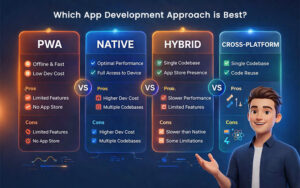
Hybrid vs Native vs PWA vs Cross-Platform: Where the Difference Exists
Security:
- Native apps are built for a specific OS, so they lock things down better than any other option.
- Hybrid apps are safe when a webview wraps them, but not always.
- PWAs run strictly over HTTPS, so hacking is just not possible.
- Cross-Platform apps are first written using a single codebase using frameworks like Flutter, React Native, or .NET MAUI, then compiled into native code. So, they mainly inherit native-level protections.
Performance:
- Native apps focus on a single platform, so you will get top-grade performance with them.
- Hybrid apps run in a browser, which is why they often feel sluggish.
- PWAs are fast-loading websites, but in reality, they are not real mobile apps, so they still lack that app feeling.
- Cross-platform apps are a golden mean, as they can provide performance standards that are a bit lower than native apps but higher than hybrid apps.
Offline Access:
- Native apps are engineered with a specific OS and platform in mind, so obviously they can work offline.
- Hybrid apps are also available offline; the difference is that they just need a plugin or two to set up.
- In the case of PWAs, you get the full experience, such as syncing, the latest content, and any server-level features, when they are online. But as they use service workers to cache files, you get just basic browsing when you’re offline.
- Cross-platform apps have no issue running offline; just check what framework you use to build them.
Timeline:
- Native apps need the longest time to build, as you have to create separate codebases for two different platforms.
- Hybrid takes much less time to develop; you can launch faster.
- PWA is renowned for its speed, but it is actually a website, not a real mobile app.
- Cross-platform apps roughly cut development time by up to 50% compared to native apps.
User Experience:
- For mobile apps, native feels the most natural.
- Hybrid gets closer, but a sharp user can feel the difference.
- PWAs are basically websites with mobile app feelings, but not a real mobile app.
- Cross-Platform apps are close enough to native; that’s why users felt satisfied using them too.
Maintenance:
- Maintenance is difficult in native apps. Two codebases mean double the time wasted in debugging and fixing errors.
- In hybrid apps, this is much easier as you have only one codebase to maintain.
- Maintenance is the simplest in PWAs, as you can push updates once and they update for everyone. Nearly 57% of users say PWAs get automatic updates, with no need to do it manually.
- Cross-platform apps are compiled into native code, but still more manageable.
App Store:
- You can easily find native apps on the App Store and Google Play.
- Hybrid apps need approval from both stores but are still available.
- PWAs’ discoverability often lacks as they are neither available on the App Store nor on Google Play; users can add them directly from their browser.
- Cross-platform apps go through the same store review process as native apps.
Scalability:
- Native scales great for app development on mobile; the only problem is you have to make it twice.
- Hybrid apps cost 30-40% less than native apps to build, so scalability issues will obviously arise later.
- A PWA development company can scale these apps for things like blogs, news, or shopping catalogs. But the problem is that if anything complex is added on, PWAs start to struggle.
- Cross-platform scales comfortably for most business apps without doubling the workload.
An At-A-Glance Comparison
| Difference Points | Native | Hybrid | PWA | Cross-Platform |
|---|---|---|---|---|
| Security | Sandboxed by OS. | Depends on WebView. | HTTPS only. | Inherits native security. |
| Performance | Fastest. | Slowest. | Fast for a website. | Close to native. |
| Offline Access | Full offline. | Needs plugins. | Service worker caching. | Depends on framework. |
| Development Timeline | Longest. | Fast. | Fastest. | Approx. 30% faster than native. |
| User Experience | Most polished. | Noticeably web-based. | Good for basic needs. | Close to native apps. |
| Maintenance | Hardest. | Easier. | Simplest, with auto-updates. | Manageable. |
| App Store | Required. | Required. | Not required. | Required. |
| Scalability | Strong but slow to build. | 30–40% cheaper to scale. | Limited for complex features. | Scales well. |
Factors That Drive the Cost
Complexity: More screens, custom logic, moving parts of apps, and the more hours it eats up, the more it pushes up the price.
AI Features: If you want things like chatbots, recommendation engines, or any smart search tools, then the price will be higher, as they add real-time to both building and testing. Integration: Every mobile app is now coming with CRM, GPS, payment gateways, and authentication systems. These things are non-negotiable and often raise the price.
Security Needs: Business owners invest in mobile app development services where apps hold high security features like end-to-end encryption, biometric authentication, multi-factor authentication (MFA), and secure API authentication. High-grade security and compliance needs always escalate the development price.
Cost Breakdown Table
| App Type | Simple Type | Complex Type | Advanced Type | Enterprise Grade | Startup MVP |
|---|---|---|---|---|---|
| Native | $40,000 – $80,000 | $100,000 – $250,000 | $150,000 – $300,000 | $300,000 – $500,000+ | $50,000 – $100,000 |
| Hybrid | $15,000 – $40,000 | $60,000 – $120,000 | $80,000 – $150,000 | $150,000 – $300,000 | $15,000 – $40,000 |
| PWA | $5,000 – $35,000 | $20,000 – $50,000 | $30,000 – $70,000 | $70,000 – $150,000 | $2,000 – $20,000 |
| Cross-Platform | $20,000 – $40,000 | $50,000 – $120,000 | $100,000 – $200,000 | $150,000 – $300,000 | $15,000 – $50,000 |
When to Choose Which Approach?
- When you want to build gaming apps, banking apps, or anything that relies heavily on a camera, GPS, or fingerprint scanner, then choose Native Apps.
- For booking apps, local service apps, and apps for small-to-mid-sized businesses, hybrid apps perform well.
- PWAs are the best option for writing blogs, news articles, or a small online store that people mostly find to browse and buy fast, without the hassle of downloading from the App Store.
- Cross-platform suits startups as well as large enterprises that want delivery apps, fitness apps, or marketplaces to launch quickly on iOS and Android without doubling the price.
The Bottom Line
To be honest, there’s no single best choice when you’re comparing PWA vs Native vs Hybrid vs Cross‑Platform. Each has its own pros and cons. So, it’s always better to choose one that fits your budget, requirements, timelines, and business goals. If you’re still unsure which route to choose? Then talk to the real experts of The Tech Clouds (TTC). Our team offers services for native apps as well as for hybrid apps. We are a renowned Progressive Web App (PWA) development company and are also paving the way for cross-platform apps. Reach out and explore our mobile app development services today.

Frequently Asked Questions
Which is better, native or cross-platform?
Depends on what you're building. Need top speed and full hardware access? Go native. Need it done faster and cheaper? Cross-platform wins.
Is hybrid app development outdated?
Not exactly dead, just not the go-to anymore. Most teams have shifted over to Flutter or React Native instead.
Which type of app is best for startups?
Cross-platform tends to fit startups best since it covers both platforms without draining the budget. Worth asking The Tech Clouds (TTC) what fits your case specifically.
Which mobile app architecture offers the best performance?
Native, hands down. It's built for one platform only, so there's nothing slowing it down.
Which approach is best for AI-powered apps?
Both native and cross-platform can handle AI features fine. Native apps just tend to run heavier processing a little smoother.
What's the cost difference between React Native and Flutter?
Pretty close honestly. React Native might come in cheaper if your developers already know JavaScript.
When should I switch from cross-platform to native apps?
Once your app starts needing deep hardware access or performance, cross-platforms just can't give you anymore. The Tech Clouds (TTC) can walk you through that switch.
Is cross-platform always cheaper than native apps?
Mostly, yeah, since it's one codebase for both platforms. But add enough custom features and that gap shrinks fast.
What's the main difference between PWA and native apps?
A PWA runs through your browser; no app store is needed. Native installs fully on the phone with complete hardware access.
Is PWA still relevant in 2026?
Definitely, especially for stores and content sites. Still one of the cheapest, quickest ways to get something live.
How do I convert a PWA into a native app?
Usually, you wrap it with something like a Capacitor, then add back whatever native features are missing. The Tech Clouds (TTC) does this kind of conversion often.
Is Netflix a PWA? Any examples of ones that are?
Nope, Netflix isn't one. Twitter, Starbucks, and Pinterest are solid real-world examples of PWAs done right.
Recent Posts






Related Blogs

Why React Remains a Leading Frontend Framework in 2027
Every business wants to accelerate its market growth. That is only possible when you choose the right technology stack. Frontend technology plays a major role. It serves as the door...

AI App Development Trends 2027: What Businesses Need to Know
A CTO opens two dashboards side by side. One is his competitor's; the other is his own. The competitor's page was built on an AI system that tracks customers' order...

How to Speed Up Your WordPress Site: The Ultimate Optimization Guide
You have gone above and beyond to build your WordPress site, but when a visitor arrives, the loading wheel starts spinning. First 3 seconds gone, then five and so on....

App Development Cost by Country in 2027: USA vs UK vs India
You may want a web app or mobile app with almost the same features, but you’re still getting three different quotes from three different agencies in three different countries. App...

How to Hire Dedicated Developers: A Complete Guide from Scratch
Most businesses don't plan to outsource. It happens when your internal teams can’t cope with the demands of the existing market. Suppose a project that requires something which your present...

The 7 Phases of Web Development: From Idea to Launch
Anyone can think of a website design while working late at night or doing a job at dawn, but the problem hits when it comes to turning it into reality....
Why Your Website Is Slow and How the Right Development Framework Solves It
Ever clicked on a site and just... left before it even loaded? You're not alone, and neither is your website if it's doing the same thing to its visitors. Mainly,...
Best Technologies for Web Application Development in 2026
Web application development has changed a lot even in the last couple of years. Frameworks keep moving; people expect pages to load within a second, and sticking with outdated tools...