


Complete Ecommerce Replatforming Checklist: Steps for a Successful Migration
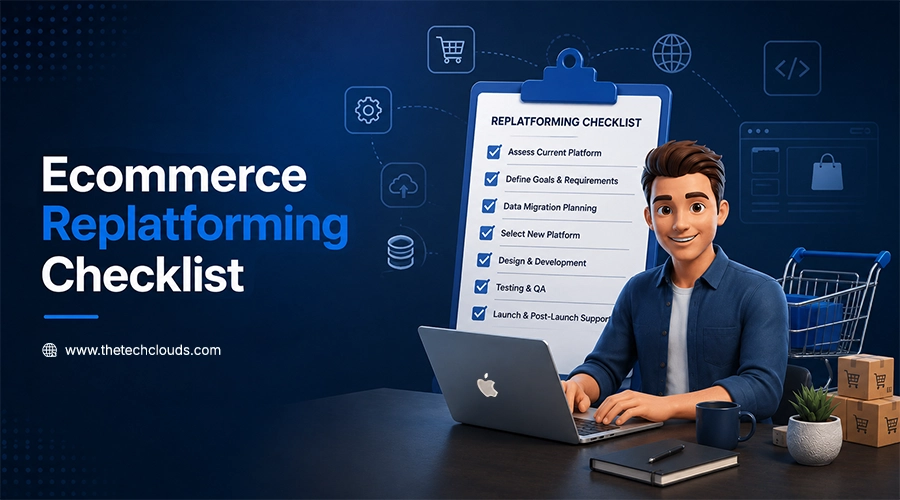
Switching completely from one store to another is a big decision. A well-planned eCommerce replatforming process is essential to boost performance, speed, and sales. This method future-proofs your business and enhances your digital presence.
But to set things in the right direction, you need an eCommerce replatforming checklist. This checklist ensures that replatforming eCommerce becomes a huge success. Otherwise, a single mistake can disrupt your online store operations. Data loss to downtime risks are heavy risks and difficult to bear.
This blog will walk you through everything you need to know before performing this task. So, if you’re just planning to start replatforming, go through this blog once to keep things aligned and achieve success.
Key Takeways:
- An organized, well-planned eCommerce replatforming checklist ensures smooth and risk-free replatforming.
- Clear goals and platform evaluation are essential before starting migration.
- Data security, SEO preservation, and integration must be carefully managed.
- Choosing the right platform impacts scalability, flexibility, and long-term growth.
- Expert guidance, like The Tech Clouds (TTC), helps reduce risks and speed up migration success.
Key Factors to Consider Before Ecommerce Replatforming
Before you begin, understand what drives a successful move. These are the core things every business must look at:
Set Clear Business Goals:
Before replatforming, list down the issues you face in your existing platform. This helps you understand your current goals and future necessities. Align the replatforming strategy in a way you want so that your business objectives are fulfilled.
Audit Your Current Platform:
Suppose you’re moving from Shopify to Bagisto, Wix to Magento, or BigCommerce to Medusa. Before replatforming, compare the features of your existing platform with your desired platform you want to move on to. Check the performance, integrations, and user experience gaps of both platforms. Knowing what works and what does not help you avoid carrying old problems into the new platform.
Compare Different Platforms:
Don’t suddenly select one platform for transition. Take time. Do proper research. Compare the platforms. Check scalability, ease of use, and support. Evaluate the pricing options also. Choose that one that goes well with your budget and goals.
Plan for Safe Data Migration:
Moving your data requires careful observation and evaluation. Product data. Customer records. History records. All these should be moved properly. A single mistake can lead to the failure. Take a backup of everything before you begin the data migration process.
Check Integration Compability:
Choosing a platform that doesn’t support your existing CRM, ERP, and other marketing systems can land you in trouble. Test integrations before starting the replatforming procedure.
Focus on Mobile-First Design:
Mobile shopping is increasing every year. Make sure your new platform works smoothly on all devices. A mobile-friendly design is not optional anymore. It directly affects your sales and search rankings.
Read More: What is Ecommerce Replatforming: A Detailed Guide
10 Steps for Replatforming Your Ecommerce Website
Step 1: Run a Full Site Audit
Before starting the replatforming procedure, check what you have in your existing store thoroughly. Check every page. Look at every feature. Evaluate the integrations. Note what’s going great and what is not. A clear picture helps you understand what to fix and what can be left as it is.
Step 2: Back Up All Your Data
Store all your data before starting the migration process. Save your product listings. Preserve your customer records and order history. And set aside your product images and content. Protect your backup in a safe place. If anything goes wrong in the move, you can restore everything without losing a single record.
Step 3: Map Your Data to the New Platform
Every platform stores data differently. Before migrating, create a data map that shows where each piece of information will go on the new platform. This step prevents mismatched fields, broken product pages, and missing customer records after the move.
Step 4: Set Up the New Platform in a Staging Environment
Do not build everything on a live site. Set up a staging or test version of the new platform first. Install themes. Configure settings. Build out the structure. Do this step by step. This is your sandbox. Test it. Fix things here first without affecting your live store.
Step 5: Migrate Data in Phases
Do not migrate your whole data all at once. Start with product details. Complete their transition. Then stretch your hands on customer records. Then order history. Use this method to handle the entire data transfer process. Breaking the process into phases makes it easier to spot errors and ensures everything stays organized.
Step 6: Rebuild & Test All Integrations
Reconnect and test each system individually. Whether it’s your payment gateways, shipping tools, email marketing software, or analytics. Don’t expect them to start running as well as they were in your previous store. To make the most of each system, make sure data flows seamlessly between your store and every connected tool.
Step 7: Recheck Your SEO Structure
Replatforming an e-commerce platform requires carefully rebuilding your SEO structure. Your URLs, meta titles, and page structure should be preserved as much as possible during the transition. Hire SEO experts to set up 301 redirects from old URLs to new ones to maintain search rankings. Ensure canonical tags are correctly implemented to avoid duplicate content issues. Update meta descriptions where necessary and submit a new sitemap to Google. Skipping this step can lead to a sharp drop in search rankings after launching.
Step 8: Do a Full Round of QA Testing
Test every new part of the new store from a customer’s perspective. Add products to the cart. Order them. Test payments. Check the filters. Browse on your mobile. Outsource software testing services to do manual testing at every stage. They are proficient and can easily find bugs if they are present. Fix every issue before your store goes live.
Step 9: Switch Over with Minimal Downtime
Plan your go-live carefully. Switch your domain DNS to the new platform during a low-traffic window. Usually late night or early morning is better for this. Keep your old platform running in the background for a short time as a safety net. Monitor the new site closely in the first 24 to 48 hours.
Step 10: Review, Fix, and Improve
Even after going live, your work is still incomplete. Track site speed. Check bounce rates. Evaluate conversion data. Listen to customer feedback. Monitoring these helps you stay updated and ahead of issues. You may encounter some issues that appear when real users start browsing. Fix problems fast and keep making small improvements. Remember that successful eCommerce replatforming is an ongoing process, not a one-time event.
What Type of Ecommerce Platform Is Better for Replatforming
Monolithic Architecture:
Monolithic architecture is a traditional structure where the front end is tightly coupled with the back end. Any changes in the back end affect the whole system. It offers simplicity but limits flexibility. It works wonders for startups but creates problems when you want scalability.
SaaS Solutions:
The vendor manages hosting, updates, and security. It’s easy to use and great for smaller businesses with basic needs. But it can limit customization when your requirements become more complex.
Modular Architecture:
You can build and adjust your store without breaking existing features. This is the most flexible option. It’s ideal for growing businesses that need to add or swap out components as they scale.
Why eCommerce Replatforming Consultants Matter
Working with an e-commerce replatforming consultant can save you time, money, and stress. Here is why it is worth it:
Deep Industry Knowledge:
An experienced eCommerce replatforming consultant has done these many times before. They know what works. They understand what to avoid. And also make decisions fast. This reduces costly mistakes early in the project.
Saves Time and Cuts Costs:
Consultants know the quickest and safest path through migration. They help you avoid reworking. Manage resources well. Keep the project moving on schedule. So, you spend less overall.
Reduces Risks at Every Stage:
Data loss. SEO drops. Long downtime. All these are real risks during eCommerce replatforming. A consultant makes an eCommerce migration strategy, analyzing these threats at an early stage of replatforming. They put protection in place. Thus, keeping your business safe throughout the entire procedure.
Final Thoughts
Ecommerce replatforming isn’t just a tech change. It’s a business move that shapes the future of your store. With the right plan and right partner, the switch feels lighter and hassle-free.
At The Tech Clouds (TTC), we believe every business deserves a smooth and safe eCommerce replatforming. Whether you’re just starting your e-commerce replatforming or need custom Ecommerce development services, our team is ready.
Use this eCommerce replatforming checklist as your starting point and let us take care of the rest. Get a free consultation today—tell us where you are, and we will show you the safest way forward.

Frequently Asked Questions
How long does e-commerce replatforming take?
E-commerce replatforming timelines typically range from a few weeks to several months, depending on the store’s size, complexity, and customization needs. Factors like data volume, integrations, and testing requirements significantly influence the duration. With a structured approach from The Tech Clouds (TTC), businesses can accelerate the process while minimizing risks and downtime.
What are the warning signs of an e-commerce platform switch?
Frequent performance issues, limited scalability, poor user experience, and integration challenges are key signs that your current platform may need to be replaced.
Recent Posts






Related Blogs

What Factors Should a Business Consider When Choosing a CRM Development Partner?
CRM is an operational tool that sits between your business and customers. A CRM development partner can transform how your business handles customer relationships. Now that CRM is the only...

Cloud Application Development in 2027: Trends, Technologies, and Best Practices
The global cloud application development market is expanding rapidly. It is $450.1 billion in 2026 and is projected to reach $806.91 billion by 2030, with a 15.7% CAGR over the...

How Do You Choose the Right Cloud Provider for Your Migration?
Picking a cloud provider for a migration isn't like picking a laptop. You're handing over your data, your uptime, and a good chunk of your budget for years. The wrong...

AI App Development Trends 2027: What Businesses Need to Know
A CTO opens two dashboards side by side. One is his competitor's; the other is his own. The competitor's page was built on an AI system that tracks customers' order...

High CPU Usage on Your Server: Causes, Diagnosis, and Fixes
Suddenly your server feels sluggish? You have seen all requests timing out, and the dashboard showing a red signal screaming: CPU at 100%. Do you know what that sign means...

Why Does My Server Keep Crashing? Common Causes and Fixes
Has your server crashed in the middle of a critical deployment, taking your uptime, your revenue, and peace of mind with it? You’re not alone. Every year, businesses lose thousands...

Common Server Problems and How to Fix Them: The Complete Guide
KeyTakeaways Most slowdowns occur when CPU stays above 90%, and disk I/O wait exceeds 10–20ms. Focusing on DNS authentication and strengthening firewall rules can prevent network hiccups, which are a...

How The Tech Clouds Built a Smarter Website & Server Monitoring Solution
Your website looks nice; nothing felt off. The server seems to be up; who knows? But then you wake up at 2 AM to check whether everything runs as you...