


How CRM Software Transforms Cleaning Businesses: The Complete Guide to Automation & Revenue Growth
The cleaning industry is rising unexpectedly fast. Customers want fast replies and easy booking. No more mix-ups or waiting around. Sticky notes and spreadsheets worked when you had five clients. They don’t work anymore once you add more staff and jobs. That’s where CRM software for cleaning businesses comes in. It keeps your leads, schedules, payments, and customer data in one spot. This guide covers what it does, why it helps, and how to pick one that fits your business.
Key Takeaways
- A CRM keeps leads, schedules, invoices, and customers all in one place.
- It cuts down the admin work that eats up your day.
- Reminders and follow-up texts go out on their own, so people actually come back.
- Whether you go off-the-shelf or custom really just comes down to how your team runs day to day.
- Faster payments and fewer missed jobs alone usually cover what you’re paying for the thing.
What Is CRM Software?
CRM software basically remembers your customers for you – who they are, what they’ve booked before, and every time you’ve talked to them.
| Tool | What it Does |
|---|---|
| CRM | Keep track of leads, customers, and follow-ups. |
| ERP | Runs the backend stuff – accounting, inventory, and related business operations. |
| Scheduling Software | Books appointment slots and manages schedules. |
| Field Service Management Software | Sends staff to job sites, tracks their work, and manages field operations. |
Include
- Simple workflow diagram
- Cleaning business example
Why Cleaning Businesses Need CRM Software
Traditional methods — sticky notes, shared spreadsheets, group text chains — worked when a business was small. They stop working the moment a company adds a second location, a third crew, or a hundred more customers.
Managing Leads Manually
Problems:
- Inquiries get buried in email or lost in a group chat and are never followed up on.
- Slow follow-ups mean a customer books with whichever company calls back first.
- Missed phone calls during busy hours turn into missed jobs entirely.
CRM Solution:
A CRM captures every lead the moment it comes in, whether it arrives through a website form, a phone call, or a Google Business Profile message, and automatically assigns it to a team member so nothing falls through the cracks.
Scheduling Challenges
Problems:
- Double bookings happen when two people update a paper calendar at the same time.
- Staff conflicts arise when nobody can see who is already assigned to a job.
- Missed appointments damage trust and lead to cancellations.
CRM Solution:
A shared, real-time calendar shows every booking, every cleaner’s availability, and any conflicts before they happen, so the same slot never gets booked twice.
Customer Communication
Problems:
- Forgotten reminders lead to no-shows on both sides.
- Lack of follow-up makes customers feel like an afterthought.
- Small complaints turn into lost customers because nobody responded in time.
CRM Solution:
Automated texts and emails handle appointment reminders, thank-you messages, and check-ins, keeping the relationship warm without manual effort from staff.
Invoice & Payment Delays
Problems:
- Paper invoices go missing.
- Payments take forever to come in.
- Owners spend long hours chasing down money that’s already owed.
CRM Solution:
Invoices generate automatically the moment a job is marked complete, and customers can pay online in a couple of taps, which shortens the time between service and payment considerably.
Team Management Problems
- Dispatching cleaners to the right job takes too much back-and-forth.
- Attendance is hard to track without someone chasing it manually.
- Job tracking gets messy when nobody knows the real status.
CRM Solution:
A shared dashboard shows who’s dispatched, who’s clocked in, and how each job is progressing, all without a single phone call. This matters even more for a commercial cleaning CRM, where multiple sites and crews are involved at once
How CRM Software Transforms Every Stage of a Cleaning Business
The whole customer journey basically breaks down into eight stages. A good CRM makes every single one of them easier.
Stage 1 – Lead Generation
Leads show up from all over: your website, Google Ads, your Business Profile, Facebook, even just phone calls. A CRM catches all of it in one inbox, so it doesn’t matter where the lead came from; it’s not getting lost.
Stage 2 – Lead Qualification
The system grabs the details you actually need: how big the property is, what kind of cleaning they want, their budget, and how often they need you. That way your team knows which leads to chase first.
Stage 3 – Estimation & Quotes
Nobody wants to wait days for a price. With instant quotes and a proposal that customers can approve right from their phone, most people say yes within minutes instead of putting it off.
Stage 4 – Scheduling
A calendar that everyone can actually see cuts out most of the back-and-forth. Staff gets assigned, routes get planned, and you know who’s free without ten texts asking around.
Stage 5 – Job Assignment
The cleaner gets the job details straight on their phone, GPS and all, plus a checklist so they know what needs doing. The system pings everyone once the job actually starts. A lot of companies go a step further with a custom CRM solution built around how their own crews actually work.
Stage 6 – Service Completion:
Before-and-after photos, the customer’s signature, an inspection checklist- it all adds up to proof that the job got done right. Protects you and gives the client peace of mind too.
Stage 7 – Invoice & Payment:
Job’s done, invoice goes out on its own. Customer pays online in a couple of taps, and if they’re late, a reminder goes out without you having to chase anyone down.
Stage 8 – Customer Retention:
This is where review requests, rebooking nudges, and the occasional loyalty perk or upsell (think a deep clean add-on) run quietly in the background. It’s what turns a one-time job into a customer who sticks around. None of this works well without solid web development behind it, since that’s really what ties every stage together.
Top Benefits of CRM Software for Cleaning Businesses
Once you actually get a CRM running, you start noticing the difference pretty quickly. Here’s what changes.
- Better Lead Management: Every inquiry actually gets saved somewhere instead of floating around in an inbox nobody has time to check.
- Faster Response Times: You get pinged the moment a lead comes through, so someone’s replying in minutes instead of whenever they finally open their email.
- Higher Conversion Rates: When quotes go out fast and look professional, way more of those “just curious” people actually turn into paying jobs. This is usually where the best CRM for cleaning companies setup earns its keep the most.
- Automated Follow-ups: The system keeps checking in with leads and old customers on its own. Nobody has to remember to do it.
- Improved Customer Satisfaction: Reminders go out when they should, communication doesn’t fall apart, and honestly, most of the small annoyances just stop happening.
- Reduced Administrative Work: Invoicing, scheduling, follow-up emails, all of it runs by itself and gives your team their time back.
- Smarter Scheduling: A calendar everyone can see in real time means you stop double-booking slots or sending two cleaners to the same address.
- Better Team Collaboration: Your office staff and your cleaners out in the field are looking at the same info, so the usual mix-ups just don’t happen anymore.
- Increased Repeat Customers: In a good residential cleaning CRM, retention texts and emails go out without anyone lifting a finger, so people don’t forget about you after one job.
- Better Reporting: You can actually see which services, staff, and marketing channels are bringing in the money, instead of guessing.
- Higher Revenue: Quicker quotes, fewer dropped leads, better retention- put it all together and you’re just booking more jobs.
- Improved Business Scalability: You can bring on more crews, open in new areas, add services, and it doesn’t turn into a mess like it used to.
Essential CRM Features Every Cleaning Business Should Have
| Feature | Why It Matters |
|---|---|
| Lead Management | Prevents missed opportunities. |
| Contact Database | Stores customer history. |
| Quote Management | Provides faster estimates. |
| Scheduling | Avoids appointment conflicts. |
| Dispatch Management | Assigns teams efficiently. |
| Mobile App | Enables real-time field updates. |
| GPS Tracking | Improves accountability. |
| Invoice Automation | Speeds up payments. |
| Payment Processing | Simplifies collections. |
| Email Automation | Saves time. |
| SMS Reminders | Reduces no-shows. |
| Customer Portal | Enhances transparency. |
| Reports & Dashboards | Supports data-driven decision-making. |
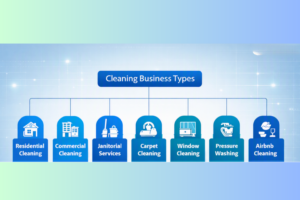
CRM Benefits by Cleaning Business Type
AI-Powered CRM Features Transforming Cleaning Businesses
AI is showing up in more and more CRM tools these days, even the ones built for smaller cleaning companies. Here’s where it’s actually making a difference.
AI Scheduling: It checks where your staff already are and who’s actually free, then just picks the best slot for you. Beats trying to figure that out yourself every single time.
Predictive Analytics: It notices when a customer’s probably about to cancel or drift off and stop booking altogether. You get a warning before they’re actually gone.
Smart Lead Scoring: New leads get sorted by how likely they are to book. So your team spends time on the good ones first instead of chasing everyone equally.
Chatbots: They handle the basic questions and grab leads even after hours when nobody’s at the desk. A solid cleaning business CRM usually has this built right in.
Automated Follow-ups: Messages change based on how a customer’s been acting, not just a generic template sent to everyone. It feels a lot less robotic to the person receiving it.
Customer Sentiment Analysis: It catches when a customer seems unhappy before they leave a one-star review somewhere public. Gives you a chance to fix things quietly first.
AI-Generated Estimates: Standard jobs get quoted almost instantly without someone manually working out the numbers. Speeds things up a lot for repeat-style jobs.
Voice Assistants: Field staff can update a job’s status just by talking, no need to stop and type on a phone. Useful when their hands are full or dirty.
Workflow Automation: Repetitive steps across the whole customer journey get handled without anyone touching them. Behind it all, reliable server maintenance services keep the system running without hiccups.
CRM Integrations That Matter
| Feature | Jobber | Housecall Pro | ServiceTitan | HubSpot | Zoho CRM |
|---|---|---|---|---|---|
| Lead Management | ✓ | ✓ | ✓ | ✗ | ✓ |
| Scheduling | ✓ | ✓ | ✓ | ✗ | Partial |
| Estimates | ✓ | ✓ | ✓ | ✗ | Partial |
| Invoicing | ✓ | ✓ | ✓ | ✗ | Partial |
| Marketing | Partial | Partial | Partial | ✓ | ✓ |
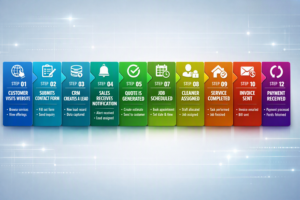
CRM Workflow
Real Business Scenario
| Before CRM | After CRM |
|---|---|
| Lost Inquiries Inquiries came in and just got lost, with nobody following up in time. | Automated Lead Capture Every lead is captured and logged automatically, no matter where it comes from. |
| Manual Scheduling Scheduling was done by hand, and mix-ups happened more often than not. | Centralized Scheduling One shared calendar handles scheduling, so nothing overlaps by accident. |
| Excel Spreadsheets Everything lived in an Excel sheet, with different versions floating around the team. | Real-Time Updates Information updates instantly, so everyone is always working from the same data. |
| Delayed Invoices Invoices went out late because someone had to remember to send them. | Faster Payments Invoices are sent automatically as soon as a job is completed, helping payments arrive faster. |
| Poor Communication Customer communication was inconsistent, and important updates were often missed. | Improved Customer Retention Automated communication keeps customers informed, increasing satisfaction and repeat business. |
How to Choose the Right CRM for Your Cleaning Business
Picking a cleaning business CRM isn’t something you want to rush into; there’s a lot riding on it. Go through this checklist before you decide.
Business Size: A tool built for a two-person crew won’t hold up once you’ve got ten or more.
Budget: Figure out what you can actually spend monthly, not just what looks good upfront.
Number of Employees: Got more staff? You’ll need more seats and proper permission levels for each person.
Mobile Access: Your crews are always out and about, so it better actually work on a phone.
Automation Capabilities: See how much CRM automation does without you touching it, stuff like reminders and invoices.
Reporting Features: You want to actually know what’s working, not just guess at it.
Scalability: Think ahead a bit; you don’t really want to create a new system again next year.
Ease of Use: If it’s confusing, your team’s just going to avoid using it, thus your CRM adoption fails.
Integration Support: It’s going to work with the stuff you already use, not make you rip everything out and start fresh.
Customer Support: When something breaks at 6am before your crews head out, you want a real human on the line.
Customization: Every cleaning company’s got its own way of doing things, and the CRM needs to bend around that instead of you bending around it.
Security: You’re storing customer’s details, their addresses and phone numbers, so this isn’t something to skip over or take lightly. Keep this checklist ready when you’re comparing options, and make sure whatever CRM you’re going to use has all these features in it. And if nothing fits your business, then look for custom CRM solutions; they are actually the better choice, providing you with the features you want rather than the other way round.
CRM Software Cost
Pricing’s honestly all over the place depending on how big your business is and what you actually need it to do. Here’s a quick breakdown of what you’re looking at.
| Type | Price |
|---|---|
| Small Business CRM | $19–$59/month for one user. |
| Growing Company CRM | $119–$249/month for a team of 5–15 users. |
| Enterprise Solution CRM | $245–$700+/month, often priced per technician, plus setup fees that can exceed $5,000. |
| Subscription vs. Custom Built | Subscription: $19–$300+/month (ongoing). Custom Build: Typically starts around $10,000–$50,000+ as a one-time investment, depending on complexity. |
| Hidden Costs | Training, data migration, and integrations can add $200–$1,000+ on top of the subscription cost, even with lower-priced plans. |
Build vs. Buy: Should You Use an Off-the-Shelf CRM or a Custom CRM?
| Off-the-Shelf CRM | Custom CRM |
|---|---|
| Faster deployment | Tailored to your workflow |
| Lower upfront cost | Long-term flexibility |
| Limited customization | Fully customizable |
| Generic features | Industry-specific functionality |
| Ongoing subscription | Greater ownership and control |
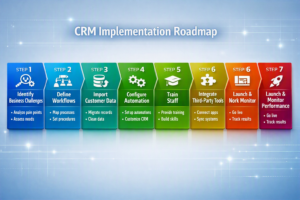
CRM Implementation Roadmap
Common CRM Mistakes to Avoid
Even picking the best CRM for cleaning companies doesn’t guarantee it’ll actually work for you. A lot comes down to how it’s set up, and honestly, half the mess comes from bad UI/UX nobody bothered to fix. Here’s what trips people up most.
- Ignoring Staff Training: Even the best system flops if your crew never actually learns how to use it properly.
- Failing to Clean Customer Data: Old messy records just drag the same mess into your new system.
- Not Integrating Existing Systems: Keeping it separate from your other tools and your team ends up doing double work.
- Overcomplicating Workflows: Too many steps just confuse everyone more than they help.
- Neglecting Customer Follow-ups: A CRM’s useless if nobody checks that the follow-ups actually go out.
- Not Measuring CRM Performance: Skip the numbers, and you’re basically just guessing.
Future Trends in CRM for Cleaning Businesses
Things move fast in this space, and what’s coming next for a commercial cleaning CRM is honestly worth paying attention to. Here’s what’s showing up already.
AI-Driven Scheduling: Bookings shift on their own based on traffic and where your crews actually are, no manual tweaking needed.
Predictive Maintenance: Equipment gives you a heads-up before it breaks, so you fix things on your terms.
IoT Integration: Sensors know when a space actually needs attention instead of just sticking to a fixed date.
Advanced Business Intelligence Dashboards: You finally get a clear read on what’s bringing in revenue. Bringing SEO experts onto your team at this point is a great way to make sure people actually find you and see those numbers grow.
Voice-Enabled CRM: Cleaners just talk to the app instead of typing; it keeps their hands free for the actual job.
Mobile-First Field Operations: More of the actual work happens right from a phone now, not from a desk somewhere.
Customer Self-Service Portals: Clients book, reschedule, and pay on their own time without calling your office at all.
Conclusion
A good CRM turns the daily chaos, missed leads, mixed-up schedules, and late invoices into something that just runs smoothly on its own. Pick one that actually fits how your team works, and the growth kind of takes care of itself from there. Need help setting one up? The Tech Clouds builds CRMs, websites, HR Management software, Project Management Software, and so on- everything made specifically for cleaning businesses, no generic templates involved.

Frequently Asked Questions
How does CRM improve customer retention?
It shoots out review requests and rebooking texts on its own, so nobody just forgets about you after their first clean.
Is CRM suitable for small cleaning companies?
Yeah, honestly, a cleaning business CRM helps small teams the most since you don't have extra hands to handle all the admin work manually.
How much does CRM software cost?
Depends on your team size, but you're usually looking at anywhere from $19 a month up to a few hundred for bigger crews.
Can CRM automate recurring cleaning appointments?
Yep, set it up once, and it keeps booking, reminding, billing, scaling, on repeat; you don't have to touch it again.
What integrations should a cleaning CRM have?
At the least, you want it connecting to your accounting software, payment processor, and email or text tools.
Does CRM work for commercial cleaning businesses?
Yeah, actually works even better there. You've got more sites and contracts to juggle, so a commercial cleaning CRM ends up saving you more headaches than it does for a small residential outfit.
Can CRM reduce administrative work?
Yeah, a lot of the stuff that used to eat your afternoon- invoicing, scheduling, follow-ups- just runs on its own now.
What are the key features to look for in a cleaning CRM?
Look for scheduling, lead tracking, mobile access, and invoicing at minimum; that's really the core of it.
Should I choose a custom CRM or an off-the-shelf solution?
If your business runs pretty standard, go with the best CRM for cleaning companies you can find off-the-shelf, but if your workflow's unusual, a custom build is worth it.
Recent Posts






Related Blogs
How CRM Software Transforms Small Businesses
Running a small business often means wearing multiple hats. One moment you’re responding to customer inquiries, the next moment you’re following up on unpaid invoices or trying to remember which...
Why CRM Adoption Fails and How to Fix It
Over 90% of businesses in today's world invest in CRM tools. Among them, nearly 70% of CRM projects fail to deliver expected results. Why is such a huge gap? Poor...
What’s the difference between a CRM and a CDP?
CRM stands for Customer Relationship Management. On the other hand, CDP means Customer Data Platform. People often become perplexed with these two terms. Most of them think that they are...
CRM Automation Trends That Will Dominate 2026
As we've stepped into 2026, we have to follow some fresh perspectives for handling customer relationships. That's why CRM automation continues to grow fast. More companies are using smart systems...
How a Custom CRM Can Boost Customer Retention and Lifetime Value
Research shows that targeted marketing can lift conversions by up to 10%. With data-driven tools, businesses can effectively segment audiences and personalize content based on preferences. Automated messaging helps sustain...
How to Choose the Best Project Management Tool: A Complete Guide
Choosing the best project management software can seem like a daunting task, especially when you’re just starting to understand what project management truly entails. Moreover, it often feels overwhelming and...
12 Best CRM Plugins for WordPress
Managing customer relationships efficiently in today’s digital world is vital to success. For WordPress users, CRM plugins offer a simple yet powerful way to handle leads, automate workflows, and drive...
Customer Relationship Management in Hospitality: A Path for Long-Term Success
Suppose you enter a hotel, and the receptionist greets you by your name, knows about your likes and dislikes, and you don’t even need to fill out the form. This...